


















Communities

Writing
Writing
Codidact Meta
Codidact Meta
The Great Outdoors
The Great Outdoors
Photography & Video
Photography & Video
Scientific Speculation
Cooking
Cooking
Electrical Engineering
Judaism
Judaism
Languages & Linguistics
Software Development
Mathematics
Mathematics
Christianity
Christianity
Code Golf
Code Golf
Music
Music
Physics
Physics
Linux Systems
Linux Systems
Power Users
Power Users
Tabletop RPGs
Tabletop RPGs
Community Proposals
Community Proposals
tag:snake search within a tag
answers:0 unanswered questions
user:xxxx search by author id
score:0.5 posts with 0.5+ score
"snake oil" exact phrase
votes:4 posts with 4+ votes
created:<1w created < 1 week ago
post_type:xxxx type of post
Search help
Notifications
Mark all as read See all your notifications »
Q&A

Welcome to Codidact Meta!

Codidact Meta is the "town hall" (meta-discussion site) for the Codidact community network and the Codidact software. Whether you have bug reports or feature requests, support questions or rule discussions that touch the whole network – this is the site for you.

Comments on Inconsistant picture sizes in users list

Post

Inconsistant picture sizes in users list

+8
−0

I just noticed this in EE, but the same symptom appears on other sites too:
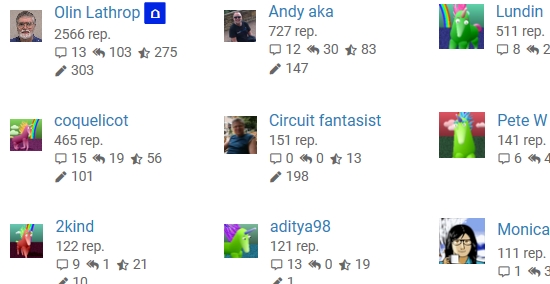
Note how the user pictures in the right column are larger than the others. On other sites this is more random, so I think the large ones being at right was just a coincidence. In any case, there seems to be a bug somewhere.

This is certainly not critical, but I figured someone would at least want to know about it.

Windows 10, Edge.

Update 25 April 2026

Are either of you still seeing this? Currently I see all the images as either 48 by 48, or either the horizontal or vertical shorter if the image is not square, but the longer side is always 48.

Yes, there is still some strangeness with avatar sizes in user lists. Here is the first page of users of the EE site:

I looked at these with a pixel editor, and most are 32 x 32 pixels. However, scrolling to the bottom of the same page:

The bottom few are a bit larger. The "D" avatar for Dave Tweed at bottom right is 36 x 35 pixels.

I found that changing the window width affects the avatar sizes. When I shrink my browser window so that only one column of users is displayed, my avatar (and apparently all the others) grows to 48 x 48 pixels:

I also noticed that there were slight changes in the avatar size for intermediate width windows.


History

1 comment thread

General comments (5 comments)
General comments
Monica Cellio‭ wrote over 5 years ago

And it's not specific to those users/images. In your screenshot mine is one of the larger ones; here on Meta it's one of the smaller. Weird! Thanks for pointing it out.

trichoplax‭ wrote 5 months ago

Are either of you still seeing this? Currently I see all the images as either 48 by 48, or either the horizontal or vertical shorter if the image is not square, but the longer side is always 48.

Olin Lathrop‭ wrote 5 months ago

See addition to question.

trichoplax‭ wrote 5 months ago

Thanks for the update. I've checked again with your points in mind and I can see all of the problems you see now. Although I previously saw some square avatars that were the full 48 by 48, I can see that there are others that are narrower, despite being square images that shouldn't need adjusting. I've confirmed that this happens across Codidact communities, on both Firefox and Chromium, in addition to you seeing it on Edge.

The cause appears to be the text to the right of the image (the username and stats). The wider the text part becomes, the narrower the image becomes (shrinking down vertically too, to keep in correct proportion). Ideally the image size should be fixed and the text should find some other way to adjust to getting wider. The stats already wrap onto the next line when the image gets down to 32 pixels wide, so this might be as simple as changing the minimum from 32 to 48 so the wrapping happens immediately with no image shrinking.

trichoplax‭ wrote 5 months ago

The fix I suggested would add some extra text wrapping to a small number of users, which doesn't seem significant to me because there is some happening already, even with the smaller avatars.

If you want to check that you find the wrapping acceptable, and that you're happy with the avatar sizes without the shrinking, you can see before and after screenshots on GitHub.